
Services · Home services
Let the professional come to you; spend no time on the road.
Home-service professionals state on their profile which areas they travel to. You see whether your address is covered, any travel fee and the open times before you send a request.

How home services work
Service area
The areas the professional travels to are on the profile; if your address is outside them, no time is offered.
Travel fee as a separate line
A travel fee, if any, is written apart from the service: included, fixed or by area; the professional sets the rule.
Times that can be reached
Travel time between two addresses is set aside in the professional’s calendar; only times they can really make are shown.
Your saved addresses
For home services you save your address in your account once; when you book you choose the address the professional comes to.
What is needed from you
What the professional brings and what is needed from you (a socket, a well-lit corner) are written beforehand.
You know who is coming
The booking names the professional who will provide the service, with their profile.
Interface
The professional’s profile and service area
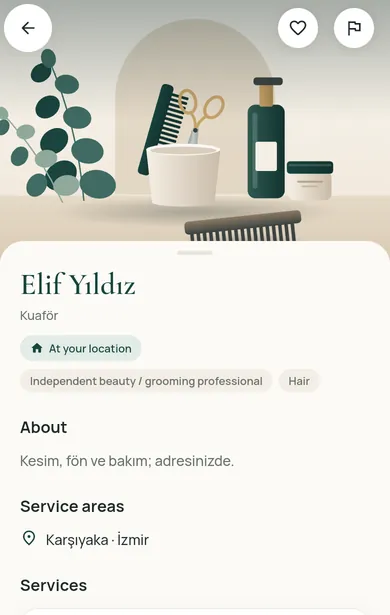
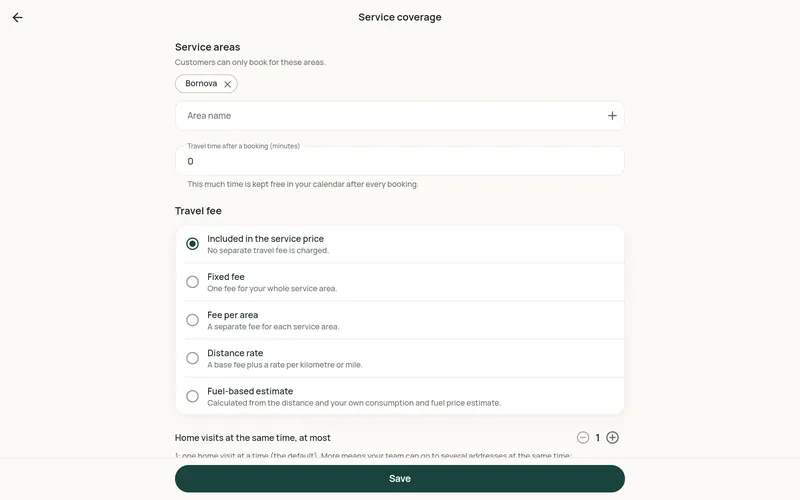
Screenshots of the Restncare web app. The business, professional and customer names on them are fictional sample records, not real people or businesses.
Do you provide services at customers’ homes?
Service areas, travel buffer, the travel-fee rule and a daily booking limit are in the partner panel.
For customers
See the options in your region
Restncare opens region by region. Once you choose your region, the content for it is shown.
For businesses
Offer your services on Restncare
Your application is reviewed; nothing is published before approval. Once approved, you run your business from the partner panel.