
Services · Groups and special occasions
Everyone on time for the same hour; you write one request.
Who is getting ready, what they want, where and by what time: you write the need once. Suitable professionals and teams send itemised quotes; the choice is yours.

From request to booking
- RequestWho, which service, where, ready by when
- QuotesItemised per person and service
- ComparisonScope, schedule, what is included
- AcceptanceAvailability is checked again
- BookingOne record for everyone
Participants
A label per person is enough: initials or a role. No real name is needed.
Area and address
At the request stage professionals see only the area; your address is shown to no professional until you accept a quote and the booking is made.
Ready-by time
You set the time by which everyone must be ready and until when quotes are accepted.
You do not state a price
Professionals and teams propose the price; items such as materials and travel are written separately in the quotes.
An event quote from one business
If you want to work with a particular business, you can ask it directly for a wedding or group quote from its profile.
A quote is not a booking
A quote is not a booking until you accept it and availability has been confirmed again.
Interface
A new group request
You save and review the request; saving invites nobody. You open the request in the next step.
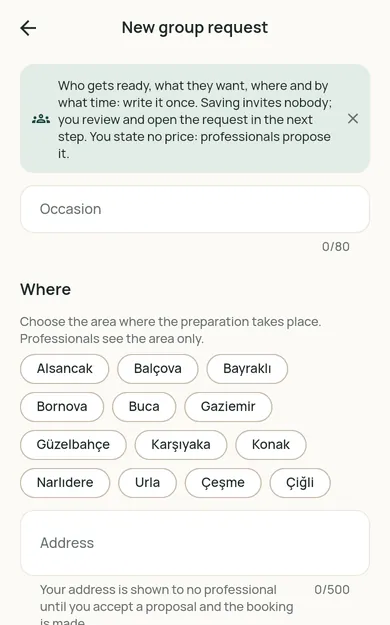
Screenshots of the Restncare web app. The business, professional and customer names on them are fictional sample records, not real people or businesses.
Do you work as a team?
See group requests, write itemised quotes; take on jobs like a wedding morning as a team.
For customers
See the options in your region
Restncare opens region by region. Once you choose your region, the content for it is shown.
For businesses
Offer your services on Restncare
Your application is reviewed; nothing is published before approval. Once approved, you run your business from the partner panel.